China Top Industrial PC Monitor Manufacturers?
Choosing an Industrial Pc Monitor manufacturer is not a logo contest. It is a decision about uptime, visibility, and support in a specific working environment. A panel beside a packaging line faces vibration, dust, and frequent cleaning. A unit mounted inside a control cabinet may instead need a compact chassis, stable touch input, and reliable operation across long shifts.
Design scholar Don Norman offers a useful warning: “A brilliant solution to the wrong problem can be worse than no solution at all.” His point concerns design broadly, not industrial monitors specifically. It still applies when comparing manufacturers. A bright display may look impressive, yet prove unsuitable if its connectors, temperature range, or mounting options do not match the installation. Small details matter.
This article examines China’s leading industrial PC monitor manufacturers through practical selection criteria. It considers product range, display size, touch technology, enclosure design, customization, and after-sales support. It also distinguishes published specifications from claims that buyers should verify directly. Ask for operating-temperature data, interface drawings, warranty terms, and sample-unit testing where appropriate. Check the details.
No single supplier fits every factory, budget, or application. Manufacturer rankings can also change as product lines and service capabilities evolve. That is worth remembering. The aim here is not to declare one universal winner, but to help buyers compare options with clearer questions and fewer assumptions. A monitor that performs well on a desk may behave differently beside a vibrating machine, under glare, or behind protective glass. Real conditions deserve a closer look.
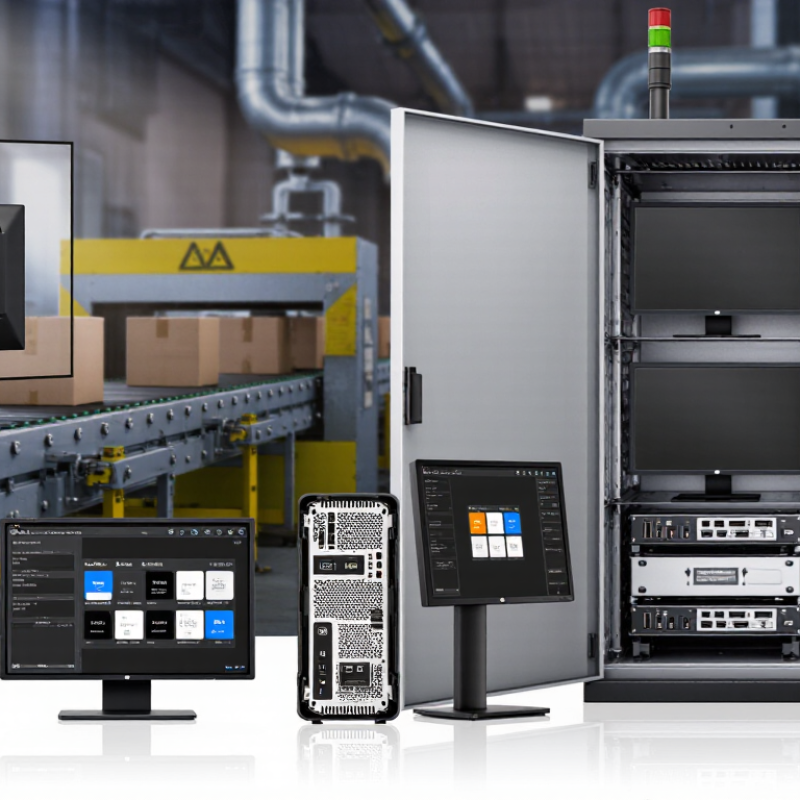
Industrial PC Monitors: Definition, Functions, and Core Components
An industrial PC monitor is a display built to provide visual control and feedback in demanding work areas. Unlike an ordinary office screen, it may need to handle vibration, dust, temperature swings, and continuous operation. Operators use it to read machine status, inspect process data, and enter commands through a touchscreen. Clear text matters: a small status label can affect a real production decision.
The monitor’s core components include the LCD panel, backlight, touch sensor, controller board, enclosure, and input ports. The panel determines resolution and viewing angles; the backlight affects brightness under strong factory lighting. A resistive touch layer can respond to gloved hands, while projected capacitive touch supports familiar gestures but may need suitable gloves. Grand View Research estimated the global industrial PC market at about US$5.17 billion in 2023. This is broader than the monitor market, but it signals investment in industrial computing systems. It does not prove every facility needs a touchscreen.
Tips: Check operating temperature, brightness, mounting pattern, and ingress protection against the actual installation. Test touch response with the gloves operators wear. A specification sheet cannot reveal every glare or cable-routing problem. Field checks still matter. Many buyers overlook service access, and that is worth reconsidering.
China’s Industrial Monitor Manufacturing Landscape
China Top Industrial PC Monitor Manufacturers?
China’s Industrial Monitor Manufacturing Landscape
China’s industrial monitor sector is shaped by a broad manufacturing base, not just display assembly. The National Bureau of Statistics reported that industrial value added by large enterprises grew 5.8% in 2024, while manufacturing grew 6.1%. These figures indicate an active factory environment, but they do not measure monitor sales directly.
Automation adds another demand signal. The International Federation of Robotics reported 276,288 industrial robot installations in China in 2023, the highest annual total worldwide. In production cells, monitors must remain readable under overhead glare and respond reliably to gloved hands. Fanless designs can also help where dust collects around equipment. Small details matter.
Manufacturers commonly compete on panel size, brightness, touch options, mounting formats, and long-term component availability. Yet specifications alone can be misleading. A bright screen may still wash out under direct light, and a sealed enclosure can complicate servicing. Buyers should test units in their actual environment and check thermal behavior, connector access, and replacement-part support. The market is capable, but consistency across batches remains worth verifying.
Leading Chinese Manufacturers and Their Product Specialties
Chinese industrial PC monitor manufacturers often focus on distinct installation and operating needs rather than one universal design. Some specialize in panel-mount displays for machine cabinets, with VESA options, sealed bezels, and touchscreens sized for compact operator stations. Others build open-frame monitors for kiosks or equipment integration, where mounting points and cable access matter more than appearance.
Rugged-display suppliers commonly offer fanless designs, wide-temperature components, and front panels rated for dust or water resistance. Capacitive touch suits quick, bare-finger input; resistive touch can be more practical with gloves or a stylus. There is no perfect panel. Brightness, viewing angle, and glare should be checked under the actual factory lighting, not only on a specification sheet. Details matter.
For buyers comparing manufacturers, request drawings, interface lists, and sample units before approving a production run. Check whether the monitor supports the needed HDMI, DisplayPort, or industrial interfaces, and confirm touch performance with the intended operating system. Ask about burn-in testing, component availability, warranty terms, and documented environmental ratings. A supplier may describe a display as rugged, but the enclosure, connectors, and installation method all affect real-world durability. Even a small cable-clearance issue can complicate cabinet assembly.
Key Technical Standards for Comparing Industrial PC Monitors
Industrial PC monitor comparisons should start with the conditions around the screen, not resolution alone. IEC 60529 defines the IP code: IP65 indicates dust-tight protection and resistance to water jets under specified test conditions. It does not guarantee suitability for every washdown setup. Check the test report and connector protection, too. Small details matter.
Electrical immunity deserves equal attention. IEC 61000-4-2 defines electrostatic-discharge test levels; Level 4 uses 8 kV contact and 15 kV air discharges. Ask whether the complete monitor was tested, including its touchscreen and cables. A panel that performs well on a bench may behave differently beside motors or variable-speed drives. EMC results need context.
Compare operating-temperature ranges, vibration evidence, brightness, and touch response at the same time. IEC 60068-2-6 provides a vibration-test method, but a pass alone does not show how a unit will fare on a specific machine. Look for test conditions, duration, and mounting details. For a sunlit control cabinet, measure readability at the actual viewing angle; a high brightness figure cannot fix glare. There is no perfect scorecard. Procurement teams can still overlook service access or glove use, so test the monitor in its real enclosure before ordering.
How to Evaluate and Select a Chinese Industrial Monitor Supplier
How to Evaluate and Select a Chinese Industrial Monitor Supplier
Choosing an industrial monitor supplier starts with the operating environment, not the catalog. Define screen size, brightness, touch method, mounting pattern, and daily operating hours. A display near a sunny factory window needs different brightness from one inside a control cabinet. Small details matter. Ask how the supplier handles custom cutouts, cable exits, and replacement units.
Review the manufacturing process as carefully as the product specifications. Request test records for brightness, touch accuracy, and continuous operation, then check whether those tests match your intended use. Ask about panel sourcing, incoming inspection, final assembly, and traceability for delivered units. A polished sample is useful, but it cannot prove every production batch will match. No checklist catches everything.
Before placing a large order, evaluate a sample in the actual installation. Check glare, touch response with gloves, connector access, and heat after several hours. Clarify warranty terms, repair procedures, spare-part availability, and response times in writing. Compare quotations line by line; a lower price may exclude mounting hardware or testing. One uncomfortable question is worth asking: who supports the unit after delivery? Supplier selection is rarely perfect, and an early sample can still miss a field problem. Keep the evaluation criteria documented, and revisit them when requirements change.